
A React design system for agentic products
You're racing to ship an agentic product, and many already out look unfinished. Install the agent components and dashboards we designed, through your coding agent or the CLI.
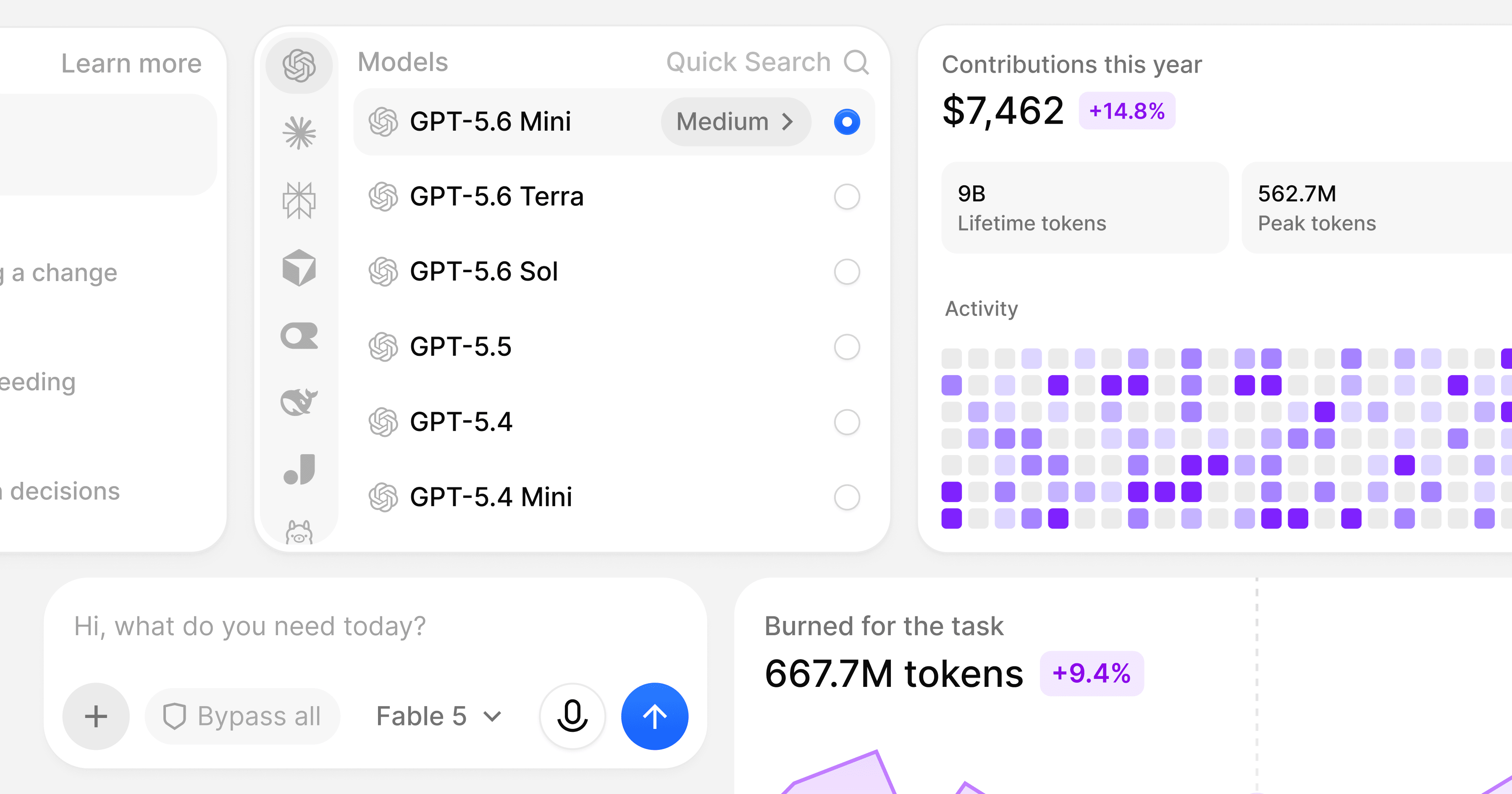
In August 2025, Gartner predicted that 40% of enterprise apps would include task-specific AI agents by the end of 2026, up from less than 5% in 2025. Yet you sign up for a new agent product and find a chat box from a tutorial. The agent thinks behind a gray spinner and answers in a wall of raw markdown.
If you're building an agent, you put your months into the model and the tools. You give the interface the last week before launch and ship the composer, the loading states and the usage meter looking like a prototype.
We built BoardUI so you can skip that week. BoardUI is a React design system for agentic products. We designed and coded the agent screens on Tailwind CSS: the composer, thinking states, task logs, research trails, usage limits and multi-agent chat. You install the parts you need and change them in your own repo while you keep working on the agent.
Your agent product can look finished on day one
Your users decide whether to trust an agent from small signals. They watch the timer on a thinking indicator and know the agent is working, and for how long. A light band around the composer marks a run in progress, so they keep using the rest of the page. On a research trail, they check the pages the agent read before it answered.
We draw each of these in Figma first, on the same 400+ design tokens the code uses, so the component you install matches the screen we drew. You get dark mode and your own accent color without writing overrides.
Agent Thinking and Composer Loader are free. Switch between the four thinking animations here:
Install the agent UI with one command
Our Composer Panel has a prompt field, an attachment menu, a model picker with search and an effort slider, a permission picker with four modes, a mic button, and a status tab for the branch, the project folder and context use. A designer and a developer would spend days drawing and building that, with all its states. With a Pro license, you add the same panel to your repo with one command, ready to wire to your agent.
The CLI copies the source into your project and adds the npm packages each component needs:
npx boardui@latest add agent-thinkingTo hand the job to your coding agent, add the BoardUI MCP server once, then ask for the screen you want. The agent reads the component list and the usage examples, then writes the files. You'll find setup for Cursor and VS Code on the MCP page.
Add BoardUI to Claude Code or Codex
claude mcp add boardui -- npx -y boardui@latest mcpcodex mcp add boardui -- npx -y boardui@latest mcpYou get plain React and Tailwind CSS in your repo, and you own and edit it like the rest of your app.
Agent components and dashboards on one design system
We built BoardUI's agent components and its dashboard components on one set of tokens. Your agent's thread uses the same type, spacing and color as your settings page and your analytics, so your customers see one product.
We designed the agent set around the products launching now: coding agents, research agents, support agents and multi-agent workspaces. Your customers will ask for reports and admin screens next, and the dashboard set has templates for finance, marketing analytics, HR, healthcare and project tracking.
The agentic components, and what each one does for your users
Composer
Your users type, attach files, pick a model and decide how much freedom the agent gets. In the permission picker they choose Auto, Manual, Plan mode or Bypass all, so a careful user can make the agent ask before each change. Each attachment appears as a tile above the prompt with its own upload ring.
Thinking and progress
Agent Thinking shows a timer and a label until the agent's first words appear. You can change the label, for example to "Searching the docs". Agent Progress tracks a multi-step run, marks the active step and the steps ahead, and keeps its place when your user collapses it.
Task list
Task List logs each task as the agent works, with its steps and the files it touched, so your users can follow along and check the work before they accept it.
Research trail
Web Search shows the queries the agent ran and the pages it opened, with each site's logo and a result count per step.
Clarifying questions
With Questionnaire, the agent asks before it acts: one question per step, with numbered options, checkboxes and a free-text answer. Your users catch a wrong assumption before the agent starts the work.
Which harness controls should stay in the top bar?
Context and usage limits
Your users stop guessing why the agent lost track of an earlier message or when they can run it again. Agent Limits Card breaks the context window a conversation uses into buckets and shows when each plan limit resets.
Agent identity
Once you run more than one agent, your users need to tell them apart at a glance. In Agent Creator, you give each one a name, a description, an animated paper avatar in one of nine shapes, an expression, a color and a voice.
Run several agents in one workspace
We built the Multi-agent Chat template as a full workspace on the Composer Panel and Agent Creator. It comes with ten sample agents and seven starter conversations, one-to-one and group chats, and a searchable sidebar with pinning and renaming. Pick agents for a group and their avatars gather into the chat. The one answering settles into a thinking state. You connect your own backend through one onRespond function that receives the agent, the messages and an abort signal.
For single-agent products we made three more Pro templates. AI Chat is a coding-agent screen in the style of Cursor or Claude Code, and AI Image Generation runs on the same shell. AI Profile turns a user's agent activity into a contributions profile with agent and token charts.
You can start with Chat Starter for free. It connects to a real model: set one AI_API_KEY from OpenAI, Anthropic, Google, OpenRouter, Groq, xAI or the Vercel AI Gateway, and it reads the provider from the key.
Use BoardUI for your dashboards, agent or not
You need stat cards, tables, charts, filters, a sidebar and settings whether you build a finance tool, an analytics product, a CRM or a rental back office. We ship 19 chart cards, a Data Table with sorting and pagination, and a free Data Grid with editable cells, filters and CSV export. The Pro templates include Finance, Marketing and Home dashboards, a Medical Profile and a Project Board.
Start free, add the agent set when you need it
The free tier has 55 components, Agent Thinking, Composer Loader, Chat Starter and the Data Grid among them, plus the MCP server and the agent rules. With Pro you get the rest of the agent set and the 10 Pro templates as a one-time purchase. At launch prices that is €149 with a year of updates, €199 for lifetime updates, or €349 for a team of up to five developers.
Set up a project with one command, then add the first agent component you need:
npx boardui@latest init
Build dashboards and agentic interfaces with BoardUI
85 React and Tailwind CSS components, 19 chart cards and 10 Pro templates. Install them with one command and own every line of the source.