The 10 best React component libraries for AI chat interfaces in 2026
The best React libraries for an AI chat UI, AI chat interface or agent UI: 10 options compared on features, pros, cons and price. BoardUI is ours and our pick.
Which React component library should you use to build an AI agent or chat interface? Our short answer: start with shadcn/ui and its free AI Elements if you want the code in your repo. If you'd rather have the thread's state handled for you, pick assistant-ui. CopilotKit fits an agent that runs on LangGraph or a similar framework and has to act inside your app.
We make BoardUI, so read our pick with that in mind. It's the one we'd choose for the designed screens around the thread, such as the composer and the task list, and most of its agent components need Pro.
Six of the ten libraries below charge nothing for their components: shadcn/ui, assistant-ui, CopilotKit, prompt-kit, Ant Design X and MUI X Chat. beUI's 18 agent components are free too. BoardUI and affectUI keep most of their agent components in a paid tier, and HeroUI's chat components all sit in HeroUI Pro.
What an AI chat interface or agent UI is made of
- The thread: the list of messages. It follows the reply while it streams and keeps your place when you scroll up.
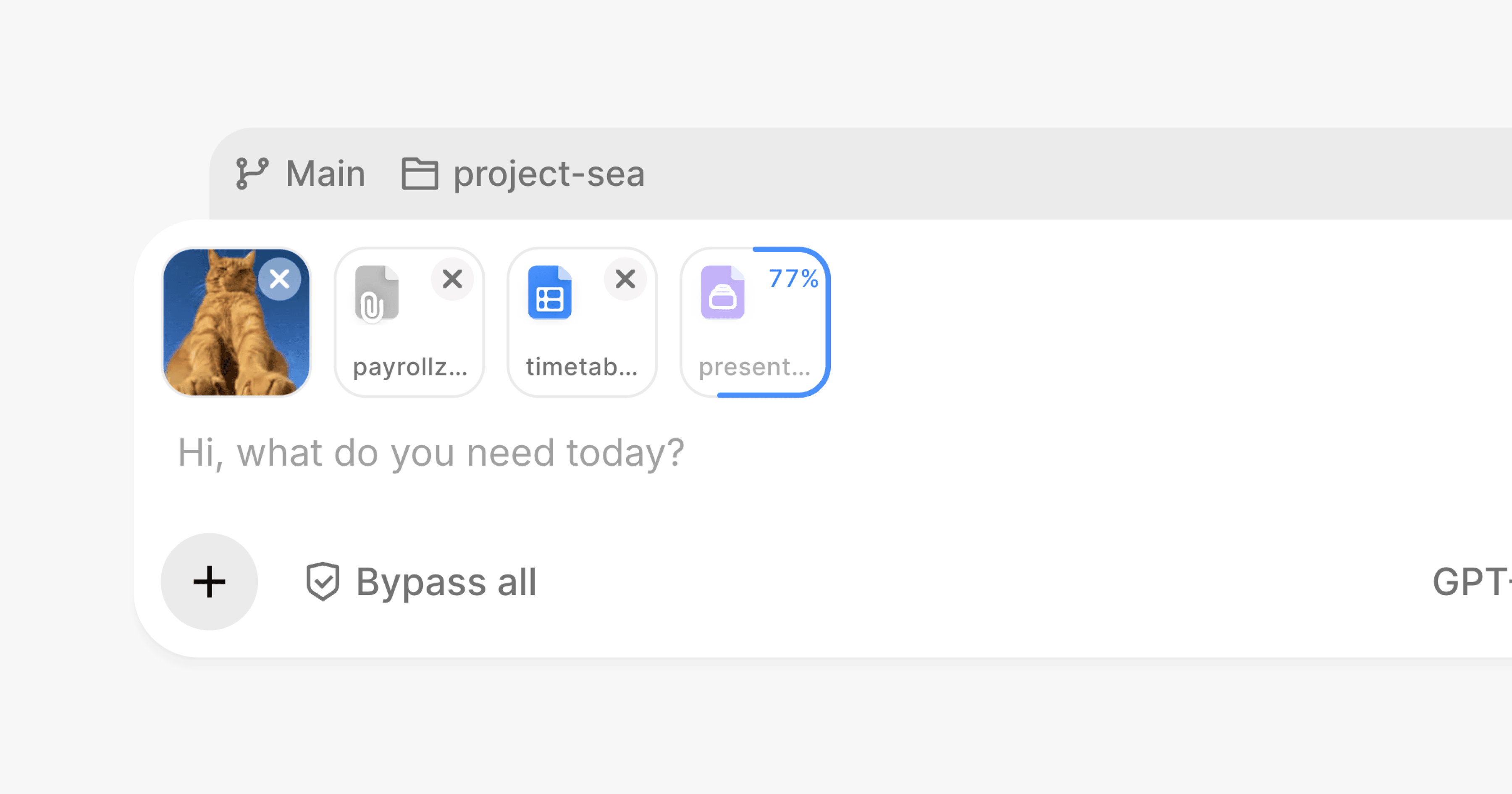
- The composer: the prompt field, with attachments, a model picker, and send and stop controls.
- The agent's steps: thinking states, reasoning, tool calls, sources, plans, and an approval before a risky action.
- The state behind it: messages, threads, edits and retries, and where the history is saved. A runtime handles this for you. With a component kit you bring your own, often the
useChathook from the Vercel AI SDK. - The screens around the chat: usage and context limits, agent profiles, settings and dashboards.
Three kinds of library, and which one you need
- Component kits: BoardUI, shadcn/ui, prompt-kit, affectUI and beUI copy source files into your repo, and you connect them to your own state. HeroUI Pro is a kit too, installed as an npm package.
- Components with a runtime: assistant-ui, MUI X Chat and Ant Design X ship their own state or stream handling along with the UI.
- An agent framework with a UI: CopilotKit connects your React app to an agent backend and brings prebuilt chat with it.
If the AI SDK's useChat already holds your messages, a component kit is enough. Reach for a runtime when you need branching, message editing, thread lists and saved history without writing them yourself.
How we chose and ordered the 10 libraries
To make this list, a library had to be built for React, ship components made for AI chat or agents, and show a commit or release in the three months before 23 November 2026. We left out LlamaIndex's chat-ui, whose GitHub repository is archived. Vercel's own AI Elements, which shadcn/ui's docs call AI SDK Elements, has no entry here because shadcn/ui's AI Elements replaces it, which the shadcn/ui section covers.
We didn't run a hands-on test for this post. BoardUI comes first because it's ours and our pick. The order of the other nine is our own judgment of how often each one is the right answer, and no benchmark produced it.
We checked every number, price and component list on 23 November 2026, on each library's own site, GitHub or npm. Download figures are npm's count for the week of 15 to 21 November 2026. BoardUI's figure is the all-time total for its CLI, and its row says so. Prices are list prices. Some vendors run temporary discounts, such as the Black Friday sales affectUI and beUI ran in late November 2026.
Comparison table: 10 React component libraries for AI chat interfaces and agent UIs
| # | Library | Best for | What you get | Free version | Price |
|---|---|---|---|---|---|
| 1 | BoardUI (ours) | Designed agent screens around the thread | Copy-in components and templates | Yes | Pro from €149, one-time |
| 2 | shadcn/ui with AI Elements | Owning the code of a chat or agent UI | Copy-in components and patterns | Yes | Free |
| 3 | assistant-ui | Chat with threads and branching handled | Copy-in components on an npm runtime | Yes | Free; optional hosted Cloud, Pro $50 a month |
| 4 | CopilotKit | Agents that act inside your app | npm SDK, runtime and prebuilt chat | Yes | Free; optional Intelligence platform, pay as you go from $49 a month |
| 5 | prompt-kit | A small chat kit for shadcn/ui projects | Copy-in components | Yes | Free |
| 6 | Ant Design X | Chat inside an Ant Design app | npm components and a stream SDK | Yes | Free |
| 7 | MUI X Chat | Chat inside a Material UI app | npm components with adapters, in alpha | Yes | Free |
| 8 | HeroUI Pro | Chat components that match HeroUI | npm components | No | $299, one-time |
| 9 | affectUI | Multi-agent and oversight views | Copy-in components, one file each | Yes | Pro $249, one-time |
| 10 | beUI | Free animated agent components | Copy-in components | Yes | Free; Pro from $129 a year |
"Copy-in" means the source lands in your repo, usually written there by a CLI, and you can edit it. An npm component stays in the package, and you change what its props and theme expose. A tick under "Free version" means part of the library is free. For BoardUI that is four of its agent parts, and for affectUI 74 of its 237 items.
1. BoardUI (our pick)
- Website
- boardui.com
- GitHub
- BoardUI/boardui
- GitHub stars
- 1.3k
- npm downloads
- 17.3k total (CLI)
- License
- MIT free tier, commercial Pro
- Pricing
- Free; Pro from €149, one-time
BoardUI is our React design system for agentic products, on React Aria Components and Tailwind CSS v4. An agent product needs more screens than a chat thread, and those are what we designed: the composer, thinking and progress states, task lists, research trails, clarifying questions, usage limits and multi-agent workspaces. The boardui CLI copies each component's source into your repo, and Claude Code or Cursor can install them through BoardUI's MCP server. Our post on agentic UI components walks through each one.
Multi-agent Chat, a Pro template, is the whole workspace: one-to-one and group conversations, an editor that gives each agent a name, a voice and an animated avatar, and the BoardUI composer underneath. You connect it to your backend through an onRespond function that receives the agent, the messages and an abort signal.
Chat Starter is the free place to begin: a working chat app with a sidebar, a composer with a stop control, a thinking indicator, streamed replies and a chat history rail kept in the browser. A Next.js route streams the answers through the Vercel AI SDK. It reads the provider from the AI_API_KEY you set, which can come from OpenAI, Anthropic, Google, OpenRouter, Groq, xAI or the Vercel AI Gateway.
Agent Thinking is free too. It sits above the composer before the first word of an answer, with a timer and a label you choose.
Composer Panel, part of Pro, is the prompt bar of a coding agent: an attachment menu, a model picker with an effort setting, a mic, a permission picker with four modes, and a status tab for the branch and context use.
Task List, also Pro, gives each task your agent works on its own row, with its steps revealed one at a time as the work streams in.
Here is the agent and chat set, and which parts are free:
| Component | What it shows | Free |
|---|---|---|
| Chat Starter | A working chat app on your own model key | Yes |
| Agent Thinking | A thinking indicator with a timer and a label | Yes |
| Composer Loader | A band of light around the composer while the agent works | Yes |
| Token Input | A prompt field where @ adds files and people and / runs commands | Yes |
| Composer, Composer Panel, Composer Attachments | The full prompt bar: model picker, permissions, attachments | No |
| Agent Progress, Task List | Plans and task logs revealed step by step | No |
| Web Search | The queries an agent ran and the sources it opened | No |
| Questionnaire | Clarifying questions as a card in the thread | No |
| Agent Limits Card | Context window use and plan limits | No |
| Agent Creator, Agent Avatar | An agent's name, voice and animated avatar | No |
| Multi-agent Chat, AI Chat, AI Image Generation, AI Profile | Full templates | No |
BoardUI key features
- React Aria Components underneath: menus, selects, dialogs and form fields get their keyboard, focus and screen reader behavior from Adobe's accessibility library.
- Source in your repo: the CLI copies each component's code into your project, and every line is yours to change.
- MCP server and agent rules: your coding agent can list, read and install components, and
initadds BoardUI's design rules for Cursor and your AGENTS.md. - Dashboards in the same system: 19 chart cards, two of them free, plus a free data table and a free data grid, on the tokens the agent components use.
- Pro at launch prices, paid once: €149 with a year of updates, €199 for lifetime updates, or €349 for up to five developers.
Pros
- Finished agent screens you would otherwise design yourself, multi-agent chat included
- A free starter that answers from a real model on the first day
- Charts and dashboards share the agent components' tokens, so a chart inside a thread matches the rest of your product
- You pay for Pro once
Cons
- Most agent components need Pro: of the set above, only Chat Starter, Agent Thinking, Composer Loader and Token Input are free
- No state layer of its own: Chat Starter uses the AI SDK's
useChat, and you wire every other component to your state yourself - No components yet for tool calls, streamed reasoning text or approvals, and Chat Starter renders only the text of a reply, so you build those parts or bring them from another kit
- Still new: the CLI first shipped in July 2026, and the repo has 1.3k GitHub stars
Best for: agent products that need designed screens around the chat, such as composers, task lists and usage limits, in code you own.
2. shadcn/ui with AI Elements
- Website
- ui.shadcn.com
- GitHub
- shadcn-ui/ui
- GitHub stars
- 129k
- npm downloads
- 19.2M/week (CLI)
- License
- MIT
- Pricing
- Free
shadcn/ui now covers chat and agents in its own docs. It released its first components for chat interfaces in June 2026 and has added to them since. Today the set includes Message, Bubble, Message Scroller, Marker, Attachment, Questionnaire, Trace and Code Block. Its CLI copies each one into your repo, on the headless base you chose: Base UI, Radix or React Aria. Two of them, Message Scroller and Questionnaire, take their behavior from the @shadcn/react npm package, and the CLI copies their styled wrapper.
In October 2026 it added AI Elements: 21 patterns for agentic interfaces, from Chat and Prompt Input to Reasoning, Tool, Plan and Subagent. Each pattern is a composition of shadcn/ui components that you copy into your project, with no package to install, and 20 of the 21 pages show how to wire the pattern to the Vercel AI SDK.
You may know AI Elements from elements.ai-sdk.dev. That one is Vercel's project, and shadcn/ui's docs call it AI SDK Elements. shadcn/ui says its own AI Elements replaces it, and Vercel announced on its site that the project would be deprecated at the end of November 2026. Components you installed from the old site keep working, and each pattern page carries a migration prompt for your coding agent.
shadcn/ui key features
- Chat components in the core library: Message Scroller holds the thread and follows the reply while it streams, and Trace shows reasoning, tool calls and sources as lines that share a shape.
- AI Elements: 21 free patterns, among them Chat, Prompt Input, Reasoning, Tool, Confirmation, Sources and Model Selector.
- Pick your foundation: Trace and Code Block are available for Base UI, React Aria and Radix.
- A chatbot template: a Next.js app on the AI SDK with streaming chat, tool calls, web search and clarifying questions.
- Scripted conversations for demos and tests:
@shadcn/helpers/ai-sdkstreams a conversation you wrote in code throughuseChat, with no model or API key. - MCP server and skills: your coding agent can browse, search and install components.
Pros
- Every file the CLI copies is yours to change
- The largest community on this list, with 129k GitHub stars
- The thread, the agent's steps and approvals all come from the same library
- Connecting a pattern to
useChatis documented on 20 of the 21 pattern pages
Cons
- You assemble and maintain the interface yourself, and any look beyond its default styles is yours to design
- It ships no state layer of its own: messages come from the AI SDK or your code, and saving history is yours to build
- The canvas, the audio player and a few other AI SDK Elements have no replacement. If you used them, you keep your old copy or rebuild them
Best for: owning the code of a chat or agent interface, at no cost.
3. assistant-ui
- Website
- assistant-ui.com
- GitHub stars
- 13.4k
- npm downloads
- 3.6M/week
- License
- MIT
- Pricing
- Free; optional Assistant Cloud, Pro $50 a month
assistant-ui is a chat library with a runtime underneath. The runtime sits between the UI and your backend and holds the conversation's state: messages, threads, the composer, branching, editing and regeneration. You install it from npm as @assistant-ui/react, and its styled components, built on shadcn/ui, are copied into your repo.
Runtime adapters connect it to the Vercel AI SDK, LangGraph, LangChain, Google ADK, AG-UI, A2A or your own server. It also runs in Vue, React Native and, through Ink, the terminal. The Vue version covers less: its docs list voice, mentions and slash commands as React only.
assistant-ui key features
- A runtime for chat state: messages, threads, branching, message editing and regeneration.
- Adapters for your backend: the AI SDK, LangGraph, LangChain, Google ADK, AG-UI, A2A or a custom server.
- A large catalog: its docs index lists 128 element pages, from an approval card and a model selector to a context breakdown and message branches.
- Four surfaces: React, Vue, React Native and Ink.
- Optional hosted persistence: Assistant Cloud saves threads and history. It's free up to 200 monthly active users, and Pro costs $50 a month with 500 included and $0.10 for each one after that.
- Set up by your coding agent:
npx assistant-ui@latest setup, plus an llms.txt, agent skills and a docs MCP endpoint.
Pros
- Threads, branching and message edits work without you writing them
- You can change backends through an adapter and keep the UI
- 3.6M weekly npm downloads, more than CopilotKit, Ant Design X and MUI X Chat combined
Cons
- The components read their state from its runtime provider, so adopting it shapes how your chat is wired
- The runtime package is pre-1.0, at version 0.15.38
- Hosted persistence is paid past 200 monthly active users, or you build your own with its persistence adapters
Best for: production chat where you want threads, branching and streaming state handled, on a backend you already run.
4. CopilotKit
- Website
- copilotkit.ai
- GitHub
- CopilotKit/CopilotKit
- GitHub stars
- 38.9k
- npm downloads
- 807k/week
- License
- MIT
- Pricing
- Free; optional Intelligence platform, pay as you go from $49 a month
CopilotKit's GitHub page calls it the frontend stack for agents and generative UI, and chat components are only one part of it. Its team also makes AG-UI, an open protocol for communication between agents and frontends. Through AG-UI, CopilotKit works with LangGraph, Mastra, CrewAI, Pydantic AI, Google ADK, Microsoft Agent Framework, AWS Strands and other agent frameworks.
For the interface, CopilotChat is a prebuilt chat you can place anywhere. CopilotSidebar and CopilotPopup wrap the same primitives as a docked panel and a floating bubble. You restyle them with CSS variables and slots, or go headless and render your own.
CopilotKit key features
- Prebuilt chat surfaces: an inline chat, a sidebar and a popup from
@copilotkit/react-core. - AG-UI protocol: typed events for text, tool calls, state, reasoning and the run lifecycle.
- Agents that work with your app: frontend tools, shared agent state, generative UI and human-in-the-loop steps.
- A runtime you host:
@copilotkit/runtimemounts in your own server, and a built-in agent runs OpenAI, Anthropic, Google or any AI SDK model with no outside framework. - Open-source core, paid platform: the packages are MIT. CopilotKit Intelligence adds saved and resumable conversations, user memory, analytics, and Slack and Teams channels. Its hosted free tier covers 1,000 interactions a month, and pay as you go starts at $49 a month with the first 10,000 included.
Pros
- Connects to the agent framework you already use
- Your agent can read app state and call tools in your frontend
- Chat, sidebar and popup work on install
- 38.9k GitHub stars, the most of the agent-specific projects on this list
Cons
- More to adopt than a UI kit: a provider, a runtime endpoint and an agent
- The prebuilt chat carries CopilotKit's own styling, so matching your design system takes CSS variables, slots or headless mode
- Saved conversations across devices, user memory and analytics sit in the Intelligence platform, whose hosted free tier ends at 1,000 interactions a month, or in storage you run yourself
- The chat in
@copilotkit/react-uiis the deprecated v1, so check that a tutorial imports from@copilotkit/react-core/v2
Best for: agents built on LangGraph, Mastra or another framework that need to read and act on your app's state.
5. prompt-kit
- Website
- prompt-kit.com
- GitHub
- ibelick/prompt-kit
- GitHub stars
- 3.2k
- npm downloads
- Not on npm
- License
- MIT
- Pricing
- Free
prompt-kit is a small set of chat components built on top of shadcn/ui. Its docs list 19, among them Prompt Input, Message, Chat Container, Markdown, Reasoning, Tool and Source. You install each one with the shadcn CLI, and the file lands in your project next to your other shadcn/ui components.
It also has blocks and two full-chat primitives, Chatbot and Tool calling, built with the Vercel AI SDK.
prompt-kit key features
- 19 chat components: from Prompt Input and Prompt Suggestion to Chain of Thought, Steps and a Thinking Bar.
- Installs with the shadcn CLI:
npx shadcn@latest add "https://prompt-kit.com/c/[COMPONENT].json". - Blocks and primitives: a chatbot and a chatbot with tool calling to start from.
- MCP setup: a documented MCP configuration lets your coding agent browse and add its components.
Pros
- Small enough to learn in a sitting, at 19 components
- Fits a shadcn/ui project with no new styling system
- Its blocks and the two chatbot primitives give you a screen to start from
Cons
- Fewer agent patterns than AI Elements: its docs list no plan, checkpoint or subagent component
- The Chatbot and Tool calling primitives are written for AI SDK v5, and the SDK's current npm release is version 7
- A quieter repo: its latest commit landed on 28 September 2026
Best for: a shadcn/ui project that needs a handful of chat components and nothing more.
6. Ant Design X
- Website
- x.ant.design
- GitHub
- ant-design/x
- GitHub stars
- 4.9k
- npm downloads
- 124k/week
- License
- MIT
- Pricing
- Free
Ant Design X comes from the Ant Design project, and its README says Ant Group uses it widely in its own AI interfaces. It has 17 components. The ones you'd reach for first are Sender for the prompt, Bubble for the messages and Conversations for the list of chats. Think, ThoughtChain and Sources show the model's reasoning and where an answer came from, and Welcome and Prompts fill the empty state.
The same repo publishes four more packages: X SDK for managing chat data streams, X Markdown for rendering streamed markdown with formulas, code and Mermaid diagrams, X Card for interfaces an agent builds over the A2UI protocol, and X Skill, which gives coding agents instructions for the library.
Ant Design X key features
- 17 AI components: Bubble, Sender, Conversations, Attachments, Suggestion, Think, ThoughtChain, Sources and more.
- X SDK: utility APIs for managing an AI app's data streams.
- X Markdown: a streaming markdown renderer with formulas, code highlighting and Mermaid.
- X Card: dynamic cards that agents build through A2UI messages.
- Built on Ant Design 6: it lists
antdas a peer dependency.
Pros
- Maintained by the Ant Design project and used inside Ant Group
- Markdown rendering and stream handling come from the same repo as the components
- Looks at home in an Ant Design app, because it is built on the same components
Cons
- It needs Ant Design 6 installed, which brings a second styling system into an app built on Tailwind CSS
- It's an npm dependency: you change the components through props and theme, and their source isn't yours to edit
Best for: teams already on Ant Design that want chat components from the same family.
7. MUI X Chat
- Website
- mui.com
- GitHub
- mui/mui-x
- GitHub stars
- 5.9k (MUI X repo)
- npm downloads
- 53k/week
- License
- MIT
- Pricing
- Free
If your app runs on Material UI, MUI X Chat puts a chat surface in the same design language. ChatBox is a single drop-in component with a message list, a composer and streaming. It connects to any backend through a small adapter interface, and an adapter for the Vercel AI SDK is built in.
MUI marks it as a preview, and the package is at version 9.0.0-alpha.22. Every Chat feature ships in the free Community plan under MIT, with no Pro or Premium tier.
MUI X Chat key features
- A drop-in ChatBox: or compose the message list, composer, conversation list and layout yourself.
- Adapters for your backend: write a
ChatAdapter, or start from the built-in AI SDK adapter. - Headless primitives:
@mui/x-chat/headlessrenders the same parts with no built-in styles, for teams that bring their own CSS. - AI and agent parts: tool approval, reasoning, sources and citations, code blocks and prompt suggestions.
- More than one conversation: a conversation list and a header with title, participants and actions.
- Screen reader behavior for streaming: the message list is one Tab stop, and a streamed reply is announced at its start and its end, never per token.
Pros
- No paid tier: every chat feature is in the free Community plan
- Picks up the Material UI theme your app already has
- Streaming is announced to screen readers once at the start and once at completion
Cons
- Still an alpha that MUI labels Preview, at 9.0.0-alpha.22
- Its themed components require Material UI and Emotion, and for a Tailwind CSS project MUI points to its headless primitives, which ship with no styles
- You get a package to update, and no component source in your repo
Best for: Material UI apps that want chat in the same design language and can build on an alpha.
8. HeroUI Pro
- Website
- heroui.pro
- GitHub
- heroui-inc/heroui
- GitHub stars
- 31.3k (HeroUI repo)
- npm downloads
- 1.1M/week (free @heroui/react)
- License
- Apache-2.0 library, commercial Pro
- Pricing
- Pro $299, one-time
HeroUI is a React library on React Aria and Tailwind CSS v4 that you install from npm. Its chat components live in HeroUI Pro, the paid package. Pro has 14 AI components, among them Prompt Input, Chat Message, Chat Conversation, Chat Tool, Chat Source, Chain Of Thought and Markdown, along with a Chat template.
Web Hero, the React edition of Pro, costs $299 for a perpetual license, with an optional $99 a year for further updates. The free library's docs list no chat components.
HeroUI Pro key features
- 14 AI components: a prompt composer, messages, a conversation viewport, tool-call cards, sources, a reasoning timeline and a markdown renderer.
- Prompt Input: attachments, toolbar actions, queued prompts, and inline tokens for mentions and commands.
- Chat Tool: collapsible tool-call cards for inputs, outputs, errors and approvals.
- Shared with the free library: HeroUI says free and Pro components use the same theme, tokens and API.
- Tooling for coding agents: an MCP server that covers both the Pro and the open-source packages, plus agent skills.
Pros
- Chat components share a theme and API with the free HeroUI components
- React Aria handles keyboard and focus behavior
- You pay once for a perpetual license
Cons
- Every chat component needs Pro, and the free library has none
- Pro is still in beta: the latest release in its docs is 1.0.0-beta.11
- Pro arrives as the
@heroui-pro/reactpackage, not as source in your repo
Best for: teams already on HeroUI that want matching chat components and are happy to pay for them.
9. affectUI
- Website
- affectui.com
- GitHub
- flohoeller/affectui
- GitHub stars
- 936
- npm downloads
- Not on npm
- License
- MIT free tier, commercial Pro
- Pricing
- Free; Pro $249, one-time
affectUI calls itself UI for AI agents, and its catalog goes deep on what happens when several agents work at once. Among its 139 components are Agent Crew, which shows a lead and its sub-agents as a live tree, Agent Handoff, Agent Inbox for background tasks, and Agent Plan, a plan you can reorder before it runs. Screens, blocks, illustrations and motion effects bring the catalog to 237 items.
Every item is one .tsx file with its styles inside, so there is no Tailwind CSS or animation library to install. 74 items are free under MIT. Pro unlocks the other 163 for $249, paid once, or $699 for a team.
affectUI key features
- Multi-agent views: trees, fleets, lanes, queues and handoffs between agents.
- Oversight components: Agent Checkpoints rewinds a run, and Agent Ledger lists everything an agent changed, with an undo for each change.
- Single-file items: each carries its own styles and needs no other dependency.
- Installs with the shadcn CLI: free items by URL, Pro items with an access key.
- MCP server: your coding agent can search items, read docs and fetch source.
Pros
- Built around several agents working at once: trees, fleets, queues and handoffs
- Works without Tailwind CSS
- Pro is a single payment with lifetime updates
Cons
- 163 of its 237 items need Pro, including every multi-agent component named above
- A young project: the repo was created in October 2026 and has 936 GitHub stars
- It ships no runtime, which leaves each view's state and data to you
Best for: products that show several agents at work, with trees, handoffs, queues and approvals.
10. beUI
- Website
- beui.dev
- GitHub
- starc007/ui-components
- GitHub stars
- 2k
- npm downloads
- Not on npm
- License
- MIT free tier, commercial Pro
- Pricing
- Free; Pro $129 a year or $179 lifetime
beUI is a library of animated React components on Framer Motion and Tailwind CSS that you install with the shadcn CLI. Its free agents category has 18 components. They include Prompt Input, Message Scroller, Streaming Response, Tool Approval, Agent Activity, Citations, File Diff and Voice Orb, plus Chat App, a complete conversation workspace.
beUI Native brings 16 of the 18 to React Native, and installs with a CLI of its own.
beUI key features
- 18 free agent components: a composer, messages, streaming output, approvals, citations, file diffs and a voice orb.
- Animated by default: components move with Framer Motion.
- Installs with the shadcn CLI: source lands in your repo.
- React Native versions: beUI Native covers 16 of the 18 agent components.
- For coding agents: an agent skill, an MCP server and an llms.txt.
Pros
- 18 agent components at no cost
- Motion comes built in, so streaming and loading states animate without extra code
- React Native components from the same team, if you also ship a mobile app
Cons
- A quiet interface means turning animations down, because motion is the point of the library
- Its premium blocks are in Pro, from $129 a year, and its templates need the $179 lifetime plan or a separate purchase
- A smaller project, with 2k GitHub stars and no npm package to track for its web components
Best for: adding free animated agent components to a shadcn/ui project, on the web and in React Native.
Which React AI chat library should you choose?
- Designed agent screens around the thread: BoardUI, our own. Chat Starter and Agent Thinking are free, and most of the other agent components need Pro.
- Own the code and pay nothing: shadcn/ui with AI Elements.
- Threads, branching and saved history handled for you: assistant-ui.
- An agent on LangGraph, Mastra or CrewAI that acts inside your app: CopilotKit.
- You're already on Ant Design, Material UI or HeroUI: Ant Design X, MUI X Chat or HeroUI Pro.
- Several agents on screen at once: affectUI.
- A few chat components for a shadcn/ui project: prompt-kit, or beUI if you want them animated.
You don't have to pick only one. assistant-ui installs through the shadcn CLI and its styled components are built on shadcn/ui, which lets a shadcn/ui project add its runtime later.
Frequently asked questions
What React component library should I use to build an AI agent or chat interface?
Start from how much you want handled for you. shadcn/ui with AI Elements is free and gives you 21 patterns to copy in. assistant-ui adds a runtime that keeps the conversation's state, and CopilotKit connects your app to an agent framework. We pick BoardUI, our own, when the product needs designed screens around the chat, and most of its agent components need Pro.
Is AI Elements free, and is it part of shadcn/ui?
Yes to both. Since October 2026, AI Elements is a set of 21 patterns in the shadcn/ui docs, free under MIT with no package to install. Vercel's earlier AI Elements project at elements.ai-sdk.dev, which shadcn/ui calls AI SDK Elements, is replaced by it. Vercel announced that the project would be deprecated at the end of November 2026, and shadcn/ui says components you installed from it keep working.
Do I need a runtime, or are components enough?
Components are enough when the Vercel AI SDK's useChat hook covers your state: it holds the messages and the streaming status. A runtime such as assistant-ui's earns its place once you need branching, message editing, thread lists and saved history, and would otherwise write them yourself.
Which of these libraries work with the Vercel AI SDK?
shadcn/ui documents AI SDK wiring on 20 of its 21 AI Elements pages. assistant-ui has an AI SDK runtime, and MUI X Chat ships an AI SDK adapter. prompt-kit's Chatbot primitive is built with it, and BoardUI's free Chat Starter streams through it. CopilotKit's built-in agent can run any AI SDK model.
Can I build an AI chat interface with MUI, Mantine or HeroUI?
With MUI, yes: MUI X Chat is free, though still in alpha. With HeroUI you need HeroUI Pro, which costs $299 once, because the free library has no chat components. Mantine's documentation index lists no chat components, so you'd pair it with one of the chat libraries above or build the thread from its primitives.
What's the best React library for a multi-agent interface?
affectUI is built around it, with Pro components such as Agent Crew, Agent Fleet and Agent Handoff. shadcn/ui's AI Elements include a Subagent pattern, and assistant-ui's catalog has a Handoff element. BoardUI's Multi-agent Chat is a Pro template with one-to-one and group conversations.
Are BoardUI's agent components free?
Four are: Chat Starter, Agent Thinking, Composer Loader and Token Input. The rest of the agent set and the agent templates need Pro, a one-time purchase from €149. If you need free agent components today, shadcn/ui's AI Elements and beUI's agents category cost nothing.

Build dashboards and agentic interfaces with BoardUI
105 React and Tailwind CSS components, 19 chart cards and 10 Pro templates. Install them with one command and own every line of the source.